Triggers
Enrol people into a sequence automatically when something happens, with conditions to narrow it, and a backfill to catch up existing records.
A trigger watches for an event, such as a lead being created or an account changing status, checks any conditions you set, and enrols the person into a sequence. It is the automatic half of Sequences.
Before you start: the sequence to enrol into must exist and be saved. A role with Manage email automations.
Build a trigger
Automation → Triggers → New trigger.
-
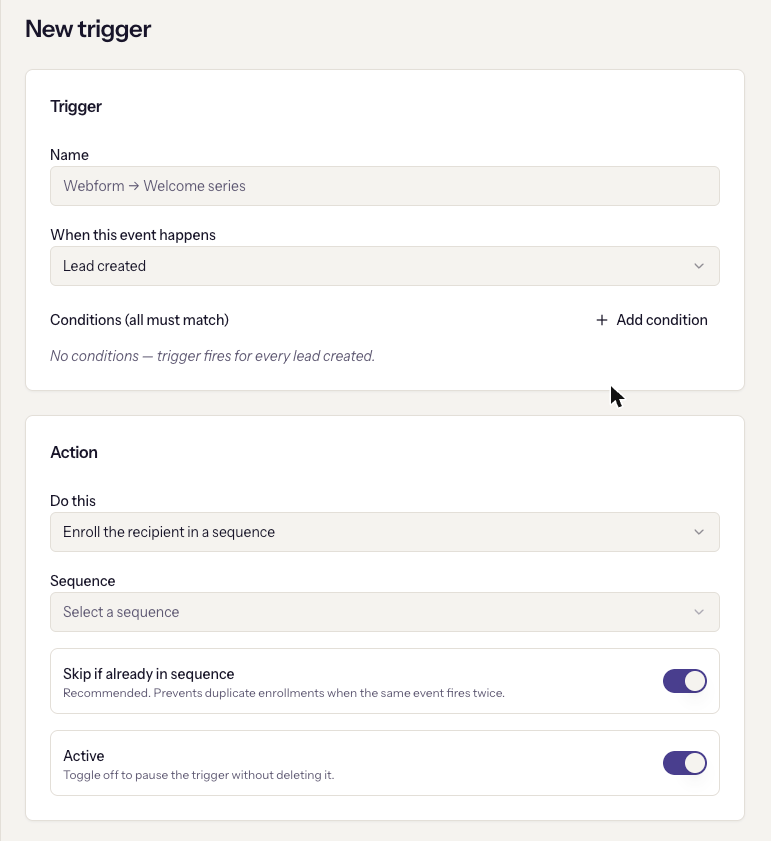
Name it for what it does, such as "Webform → Welcome series".
-
When this event happens. The events are:
Event Fires when Lead created, Lead updated, Lead stage changed, Lead tag added, Lead converted A lead changes in that way Contact created, Contact tag added A contact changes in that way Public API lead submitted A lead arrives through the API, such as from a website form Account created, Account status changed, Account tag added An account changes in that way. These enrol every active contact of the account -
Conditions (all must match). Optional. Each condition is a field, an operator, and a value. Text and number fields offer equals, does not equal, is one of, is not one of, is empty, is not empty. Tags offer contains, does not contain, is empty, is not empty. Stage and status values are pulled from your own settings, so custom statuses appear. With no conditions, the helper says it plainly: the trigger fires for every lead created.
-
Do this. Enroll the recipient in a sequence and pick the sequence. The other option, sending a template directly, is listed but disabled; it is only available through the API for now.
-
Skip if already in sequence stays on. It stops the same event firing twice from enrolling someone twice.
-
Active is on by default. Turn it off to pause the trigger without deleting it.
Create trigger saves it. From then on, every matching event enrols.
Catch up existing records
A trigger only fires on new events. To enrol the leads or contacts that already match, click Run on existing in the editor header.
The dialog previews how many records match and how many were scanned, then Enroll N records does it. Three things it tells you that matter:
- The scan stops at 10,000 rows. "Results above reflect that subset." Narrow the conditions if you have more.
- Account triggers fan out. Each matched account enrols every active contact at it, so sends can exceed the match count.
- Each run has a limit. If the run hits the per-request limit of new enrolments, the result says so and offers Run again. Already-enrolled records are skipped, so repeating is safe.
Suppressed addresses and people already active in the sequence are always skipped.
Watch it work
Enrollments from this trigger at the bottom of the editor lists who it enrolled and where they are in the sequence, with the same Stop controls as the sequence's own tab.
When it goes wrong
- Create trigger is disabled. It needs a name and, for the enrol action, a sequence.
- "No sequences yet — create one first." Build the sequence before the trigger.
- Nothing is enrolling. The trigger is inactive, the sequence is paused, the conditions do not match the events you expected, or the people are suppressed. Check Run on existing to see what would match right now; a preview of zero means the conditions.
- Far more people enrolled than expected. An account trigger fanned out to every contact at each account.
- "Delete this trigger? Existing enrollments are unaffected." Deleting stops future enrolments; people already in the sequence continue.