Write and publish articles
Draft help articles, organise them in categories, publish them to customers and the AI, and find the ones that need fixing.
Articles are the content of your help centre. The same article is read by customers on the public knowledge base, by agents drafting replies, and by the AI when it answers a visitor or an email. Publishing is the moment all three start using it.
Before you start: who can create, publish, and manage categories is set under Support → Knowledge Base → Configuration; see Publish your knowledge base. If you cannot see New Article, that is why.
Write an article
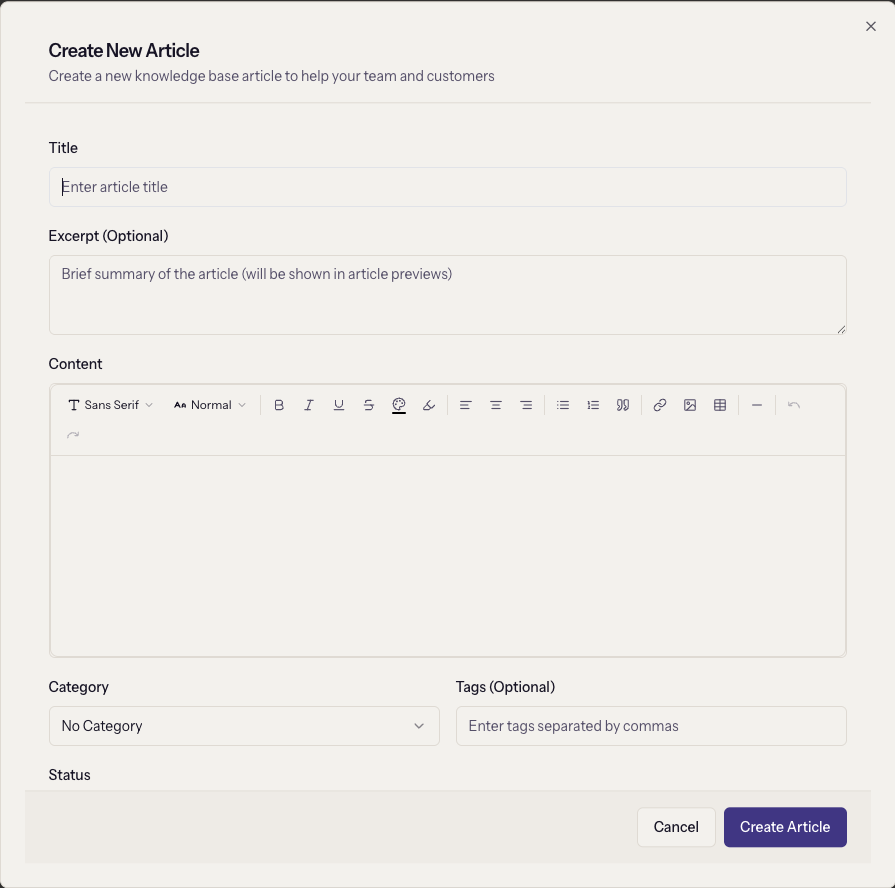
Support → Knowledge Base → New Article:
- Title and Content are required. The content editor is rich text.
- Excerpt is the summary shown in lists and search results. Write it; the AI uses it too.
- Category groups the article; Tags are comma-separated and help search.
- Status: Draft is internal, Published is live everywhere, Archived hides it without deleting.
- Featured Article promotes it on the help centre's front page.
Under SEO Settings, the URL Slug is generated from the title until you edit it, and SEO Title and SEO Description override what search engines show. The counters turn red past 60 and 155 characters but do not block saving.
Organise with categories
The Categories tab creates and edits categories with a name and a description. Deleting a category leaves its articles in place as uncategorised. Category names also become the help centre's SEO keywords unless you set your own.
Publish
Set Status to Published and save. From that moment the article is on the public help centre if public access is on, searchable from the chat widget and the launcher, offered to agents in the ticket composer, and used by the AI.
Publishing changes what the AI says
A published article is an instruction to the auto-responder. Publish a wrong refund policy and the AI will quote it to customers within the hour. Keep publishing rights narrower than drafting rights until reviews are routine.
Find what needs fixing
The Analytics tab shows totals, Most Viewed Articles, Most Helpful Articles ranked by helpfulness ratio, and Needs Attention, which lists articles rated helpful less than half the time. Those are the ones to rewrite first; they are what readers found and did not trust.
Product Analytics adds the other half: the searches that found no article at all. Together they are the writing queue.
When it goes wrong
- The article is not on the public site. Its status is Draft, or public access is off.
- The AI does not use a new article. It is still a draft, or the AI is off for that channel.
- "Title is required" or "Content is required". Both must be filled.
- A slug conflicts. Edit the URL Slug to something unique; the public URL shown under the field updates as you type.